How it works

How Glia Quest tests your application.

Three steps. Two minutes. From a URL to a Reachability Score and a per-feature map of what your users can find, and what they can't.

Step 01

Tell us about your application.

Provide the entry point of your web application: staging, preview, or production. No SDK install. No code instrumentation. Optional auth credentials and personas you want to simulate.

Step 02

The agent explores.

The AI navigates the way a real user would: clicking, scrolling, filling forms, following links. It builds a Navigation Map in real time, recording every feature it can reach and how it got there.

Step 03

Read the report.

Get your Navigation Coverage Score and a feature-by-feature report. Reachable features show the path the agent used. Unreachable features show what was detected but never visited.

Step 01 in detail

Tell us about your application

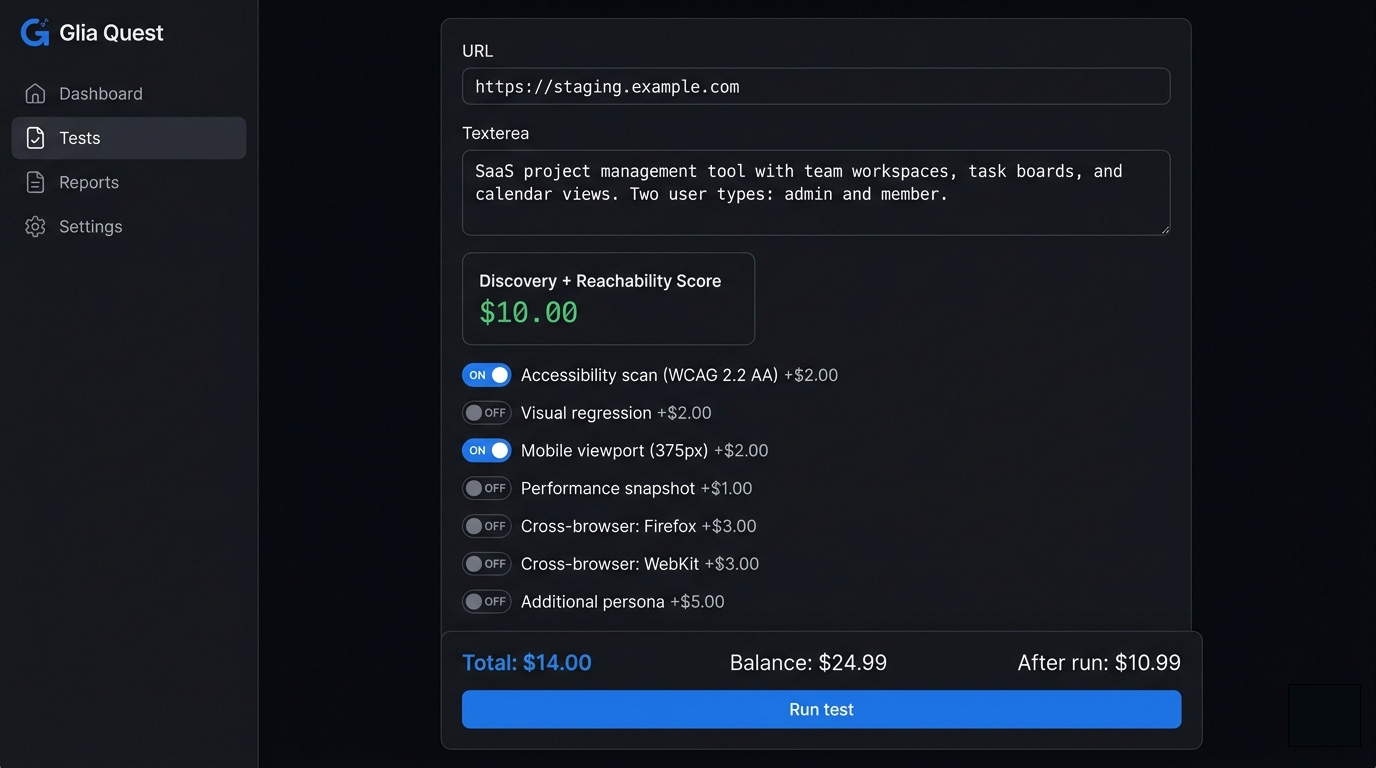
Provide your application's URL and any optional context: test credentials for authenticated areas, the user personas you want to simulate, and the regions of your application that matter most. No SDK install. No code instrumentation. No test scripts to maintain. The configuration takes minutes, not days.

Glia Quest test configuration screen with URL input, feature description, and toggle options
Step 02 in detail

The agent explores your application

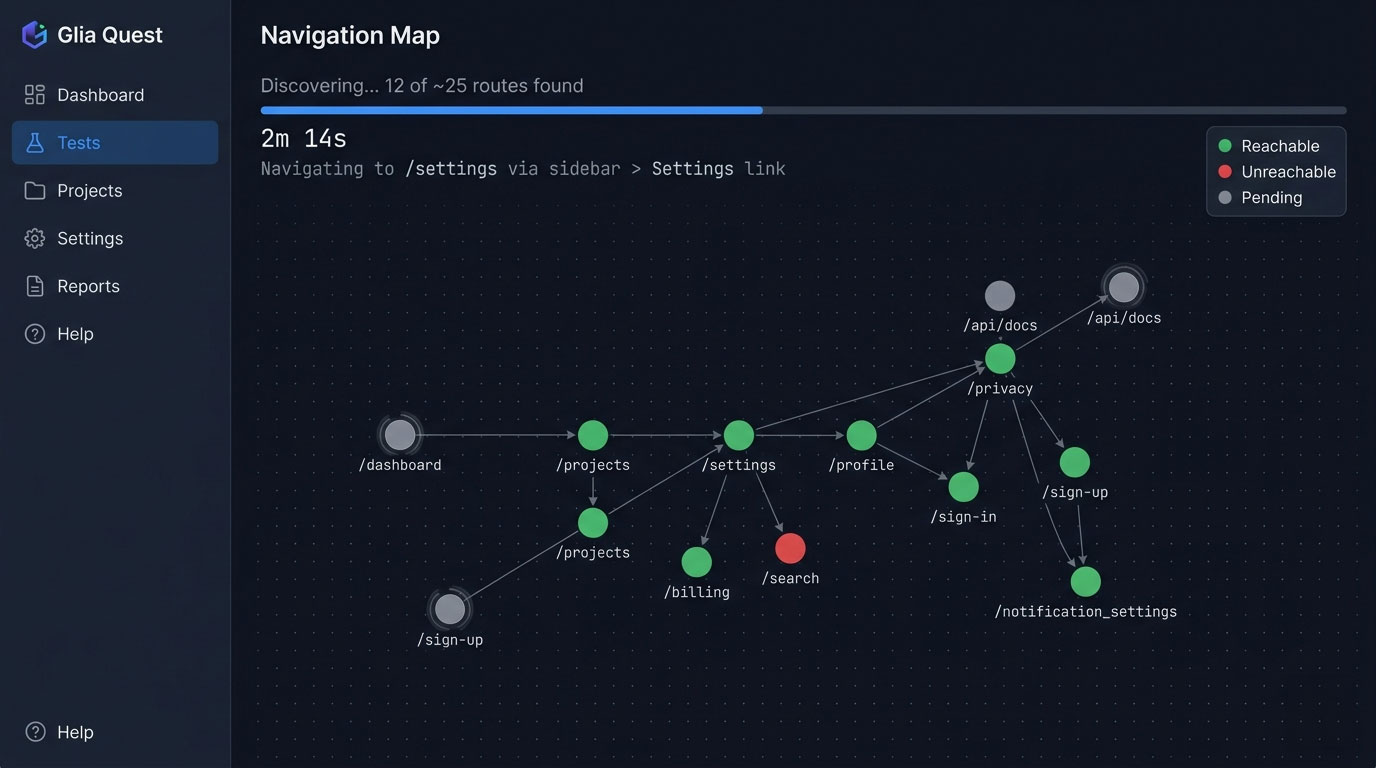
The AI navigates your application the way a real user would: clicking, scrolling, filling forms, following links, and observing responses. It builds a Navigation Map in real time, recording every feature it can reach and how it got there. As the map grows, you watch new nodes appear: pages, modals, settings panels, workflow steps. The exploration runs until coverage stops growing.

Glia Quest Navigation Map during active discovery, showing routes being found in real time
Step 03 in detail

See your Reachability Report

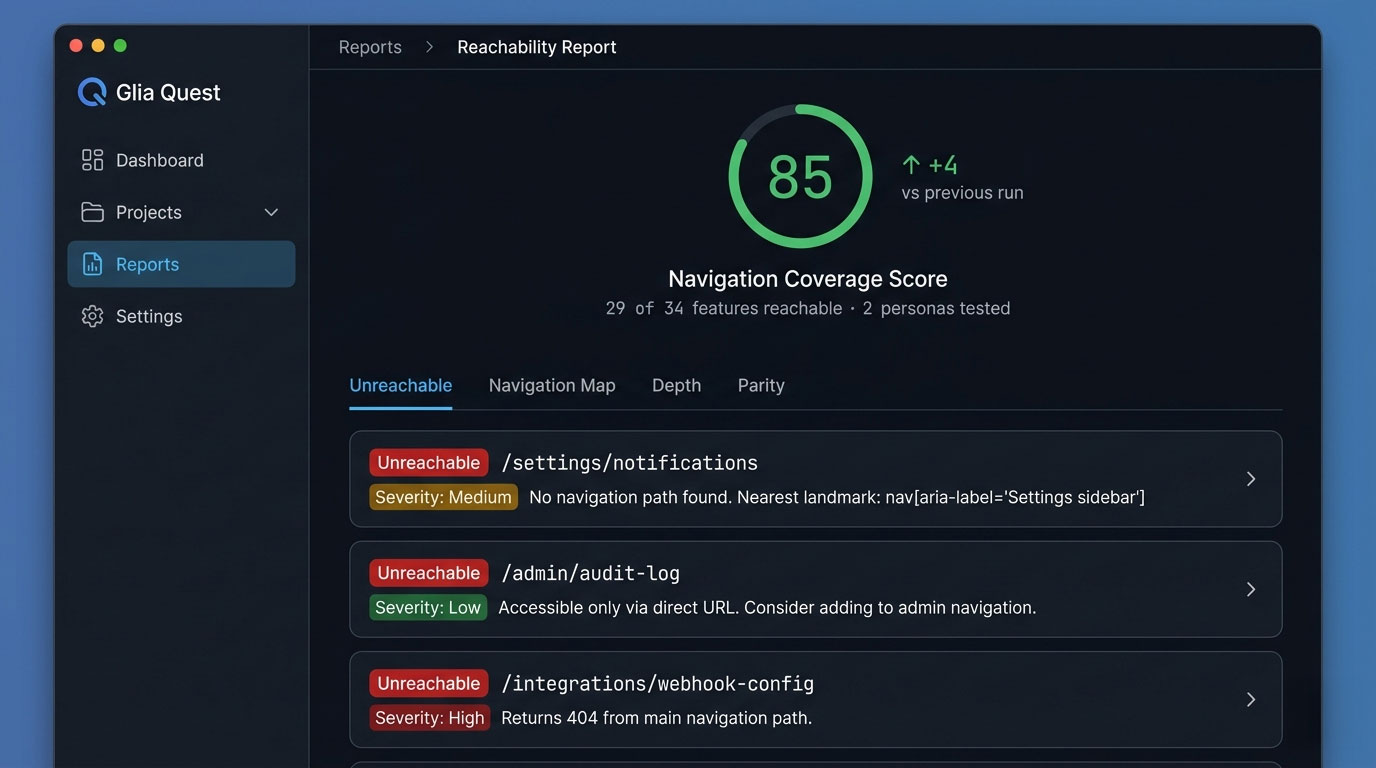
When the run completes, you receive your Navigation Coverage Score and a feature-by-feature report. Reachable features show the path the AI used. Unreachable features show what was detected but never visited. You see, at a glance, which parts of your product your users can actually find, and which parts are invisible.

For every unreachable feature, Glia Quest generates an investigation prompt you can paste directly into Claude Code, Cursor, or your preferred AI coding assistant to track down the navigation gap in your codebase.

Your report is delivered to your inbox the moment it is ready. No need to watch the dashboard.

Glia Quest Reachability Report showing an 85% Navigation Coverage Score with unreachable features listed
Ongoing

What happens after your first scan.

Your first discovery run maps your application's complete navigation structure. Every subsequent check is faster and cheaper.

Regression runs use cached scripts from your previous discovery to confirm that known routes are still reachable. They skip the AI inference phase entirely, so they return results in minutes at a flat $5.00 regardless of application size. Run a regression after every deploy to catch navigation breaks before your users do.

The recommended workflow: run a full discovery when you add features or restructure navigation. Run regressions between discoveries to maintain confidence. One discovery per month with regressions after each deploy keeps your Navigation Coverage current without the cost of a full AI scan every time.

Automation

Automate your testing workflow.

Manual testing is the starting point, not the destination. Subscribers can schedule recurring scans on a weekly, monthly, or custom cadence. Results arrive by email, Slack, or PDF without anyone needing to log in.

Premium+ goes further: install a deploy hook in your CI/CD pipeline, and Glia Quest scans your application automatically every time you ship. Regressions by default, with full discoveries triggered when your last one exceeds a configured age. Your Navigation Coverage certification updates in near real-time, reflecting your actual production state after every deploy.

Certification

Prove it with a badge.

When your application achieves 100% Navigation Coverage across all personas, you earn a Navigation Coverage Certification: an embeddable badge that verifies your navigation quality publicly. Three tiers from monthly verification to continuous deploy-triggered monitoring.

Learn about certification →

The score

Understanding your Navigation Coverage Score.

One number, from 0 to 100. Thresholds at 60 and 80. Higher is more discoverable.

92
High · score > 80
73
Mid · score 60–80
48
Low · score < 60
What is the Navigation Coverage Score?

A single number from 0 to 100 representing the percentage of your application's features that are reachable through normal navigation from the entry point. A score of 100 means every feature your application exposes is discoverable. A score of 70 means 30% of your features exist but no path leads users to them.

How is the score calculated?

After our AI completes its exploration, we identify the set of distinct features it reached. We then compare that against the features it could detect in the codebase output but could not reach by navigation alone. Reachable features divided by total features, multiplied by 100, gives the score.

What does a low score mean?

A low score means your application has substantial functionality that users cannot find on their own. This often correlates with low feature adoption, increased support load, and the perception that the product is missing features it actually has.

How should I improve my score?

The per-feature report shows you exactly which UI surfaces are unreachable. The fix is usually a missing entry point: a link from a hub page, a menu item, a contextual prompt at the right moment in the user journey. Small navigation changes often produce large score improvements.

What is reachability testing?

Reachability testing is the practice of verifying whether users can discover and reach application features through normal navigation, without knowing direct URLs. Unlike conventional testing tools that verify whether a page works at its URL, reachability testing verifies whether any navigation path leads to that page.

Quality Rating

What the Quality Rating measures

The Quality Rating answers a second question: of the features your users can reach, how many are correct? During the same scan that produces your Navigation Coverage Score, five deterministic checks run on every page — at no additional cost and no additional scan time.

Page completeness. Does every page have a title and meta description?

Sensitive data exposure. Are API keys, JWT tokens, or database identifiers visible in the rendered page?

Non-production domain references. Do any pages reference localhost, staging, or development URLs?

Navigation component integrity. Does every page contain a functioning navigation landmark?

Cross-locale rendering. On internationalised applications, does each page render text in the expected language?

The Quality Rating is an A–F letter grade derived from the percentage of reachable pages passing all five checks.
Sitemap-anchored scoring

How the score works

The Navigation Coverage Score has two inputs: what your site declares and what your users can reach. Your sitemap is the declaration. It lists every page your application says it has. Glia Quest reads this first — before the AI agent launches, before any credits are consumed. The score is the ratio: pages reached through navigation, divided by pages declared in the sitemap. An application that declares 82 pages but only 30 are navigable scores 37%.

See your score. Fix what's hidden. Test again after your next deploy.

Free preview. No credit card. We email you the report when Glia Quest goes live.

Preview audits use shared infrastructure · 50 pages max · results in ~60s